2026.03.0-pre.01
Pre release: Introducing Conditional Cell Colouring, enhanced Filters, new Fields, NocoDocs, and more.
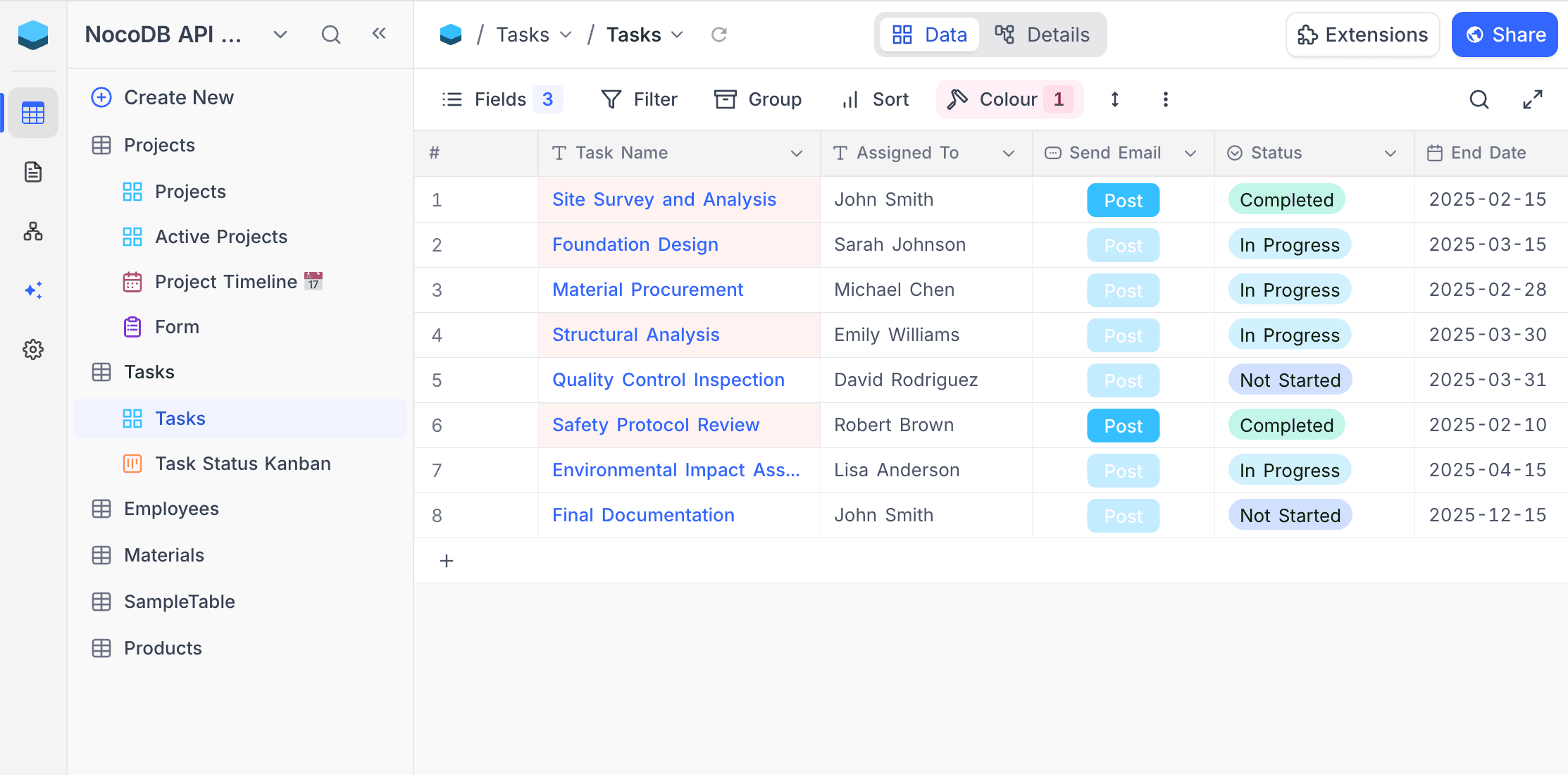
🚀 Introducing Conditional Cell Colouring — Highlight What Matters, Right Where It Matters
I use row colours, but I really need to highlight just one column based on its value.
Our team misses critical status changes because everything looks the same in the grid.
Row colouring helps you spot patterns across records, but sometimes the insight lives in a single field. A deal amount that's unusually high. A status that just changed. A date that's overdue.
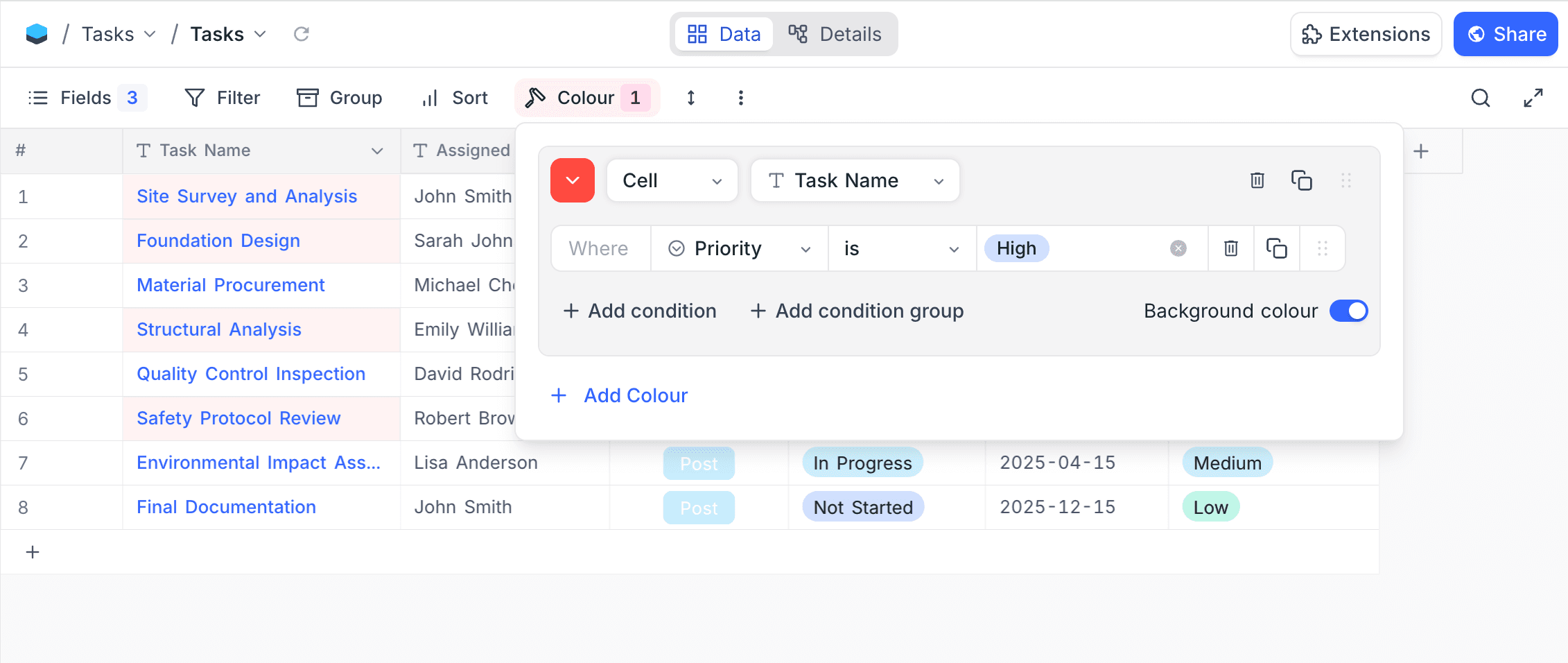
Introducing Conditional Cell Colouring. Apply colour rules to specific fields within your grid view, so the most important data stands out at a glance — without colouring the entire row.
🌟 Why This Matters
Before:
- Only row-level colouring available
- Important field-level signals lost in dense grids
- No way to visually prioritise individual data points
After:
- Apply colour conditions to specific fields
- Background colour or left-border indicator modes
- Combine with row colouring — cell colour takes precedence for targeted fields
- Conditions evaluated per record using familiar filter logic
Available in Grid view. Learn more.
🚀 Introducing Conditional Button Fields — Buttons That Know When to Act
Our "Send Invoice" button shouldn't be clickable until the status is "Approved".
Users keep clicking action buttons on records that aren't ready, causing errors downstream.
Button fields are powerful — they trigger webhooks, open URLs, and run scripts. But not every record is in the right state for every action.
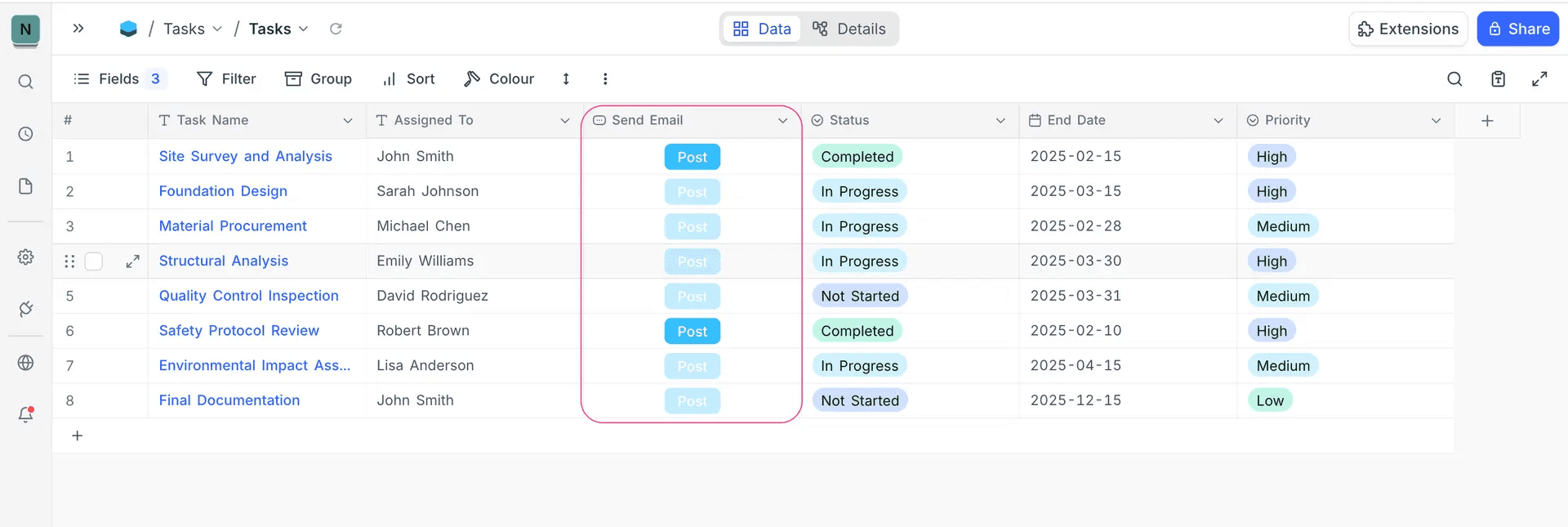
Introducing Visibility Conditions for Button Fields. Define filter-based rules that control when a button is active. When conditions aren't met, the button appears disabled with a clear "Conditions not met" tooltip.
🌟 Why This Matters
Before:
- Buttons always active, regardless of record state
- Users triggering actions on incomplete or invalid records
- No guardrails to prevent premature actions
After:
- Define visibility conditions using the familiar filter builder
- Buttons automatically disabled when conditions aren't met
- Works with all button types: Open URL, Run Webhook, Run Script
- Supports AND/OR filter groups for complex logic
Conditions are evaluated per row in real time. Learn more.
🔍 Smarter Filters — Pinned Filters, Toggle Filters & AI Filters
Filters just got significantly more powerful with three new capabilities.
📌 Pinned Filters
Pin up to 3 frequently used filters directly to the toolbar as compact, interactive pills. Change filter values instantly from the toolbar — without opening the filter panel.
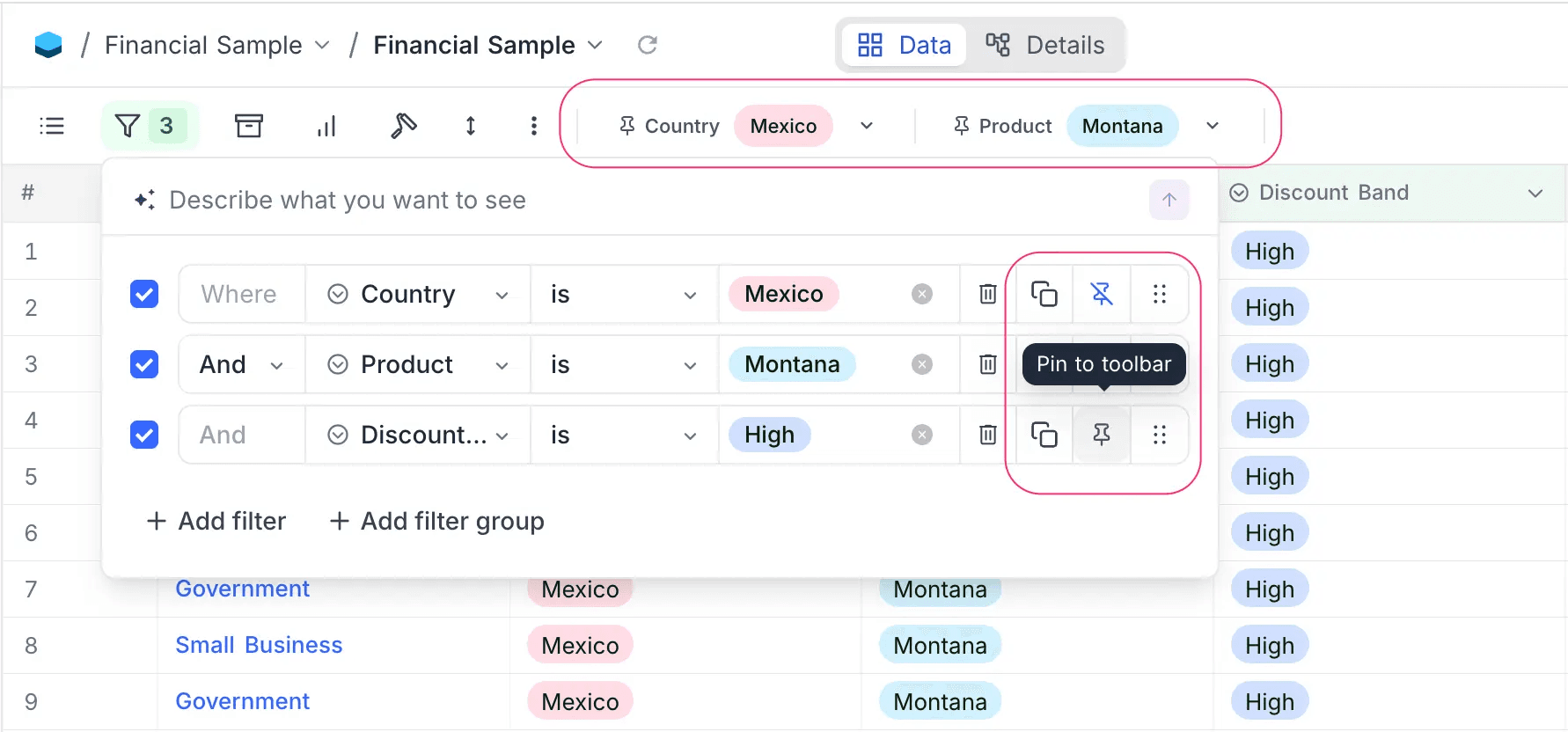
Supported field types: SingleSelect, MultiSelect, User, CreatedBy, LastModifiedBy. Learn more.
🔘 Toggle Filters
Every filter row now includes a checkbox to enable or disable it. Disabled filters preserve their configuration but don't apply to the view — perfect for temporarily turning off conditions without deleting them.
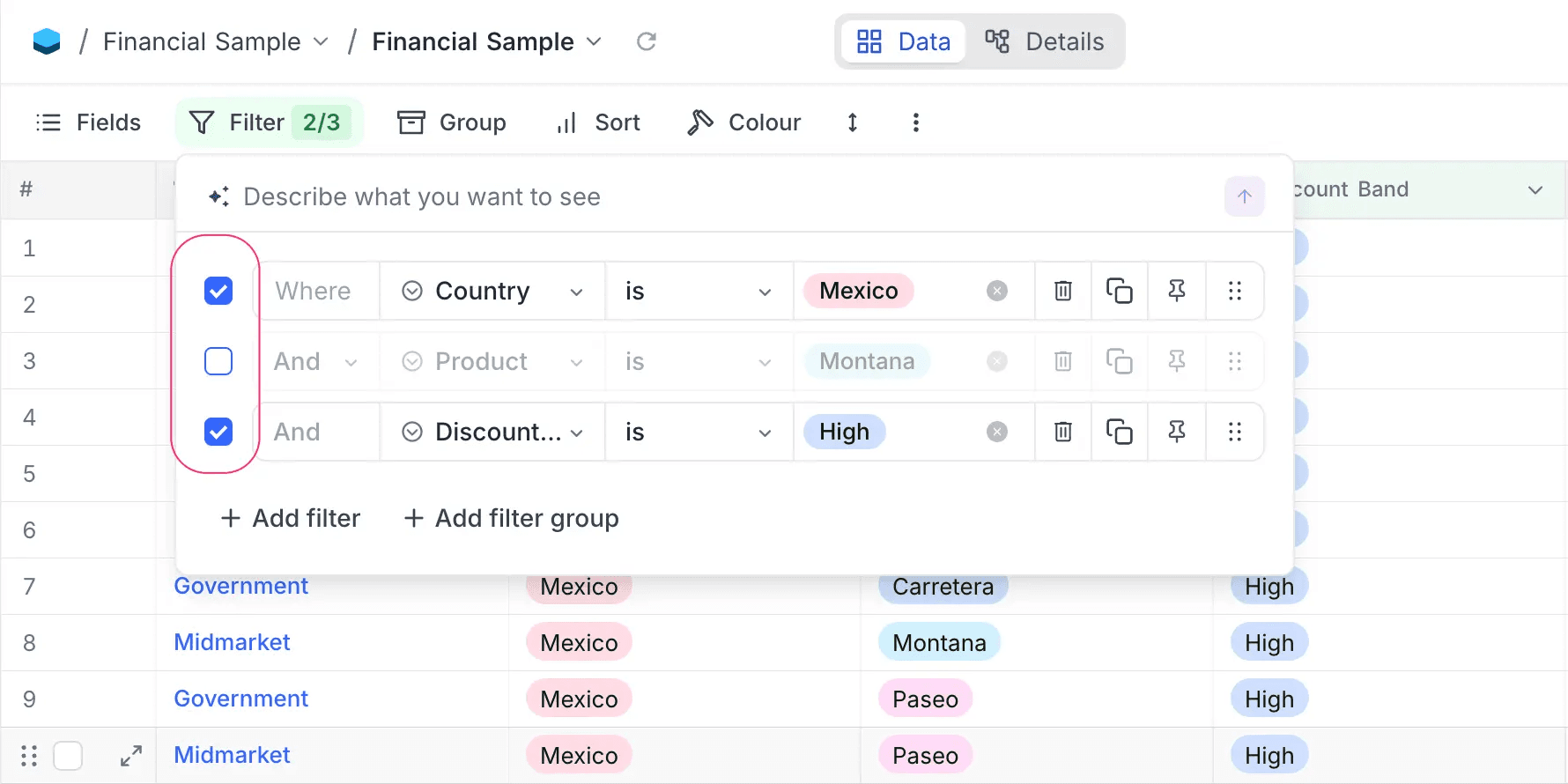
The toolbar badge shows the count as "enabled/total" (e.g., 2/5) when some filters are disabled. Learn more.
✨ AI Filters
Describe the filter you need in plain English, and NocoDB builds it for you.
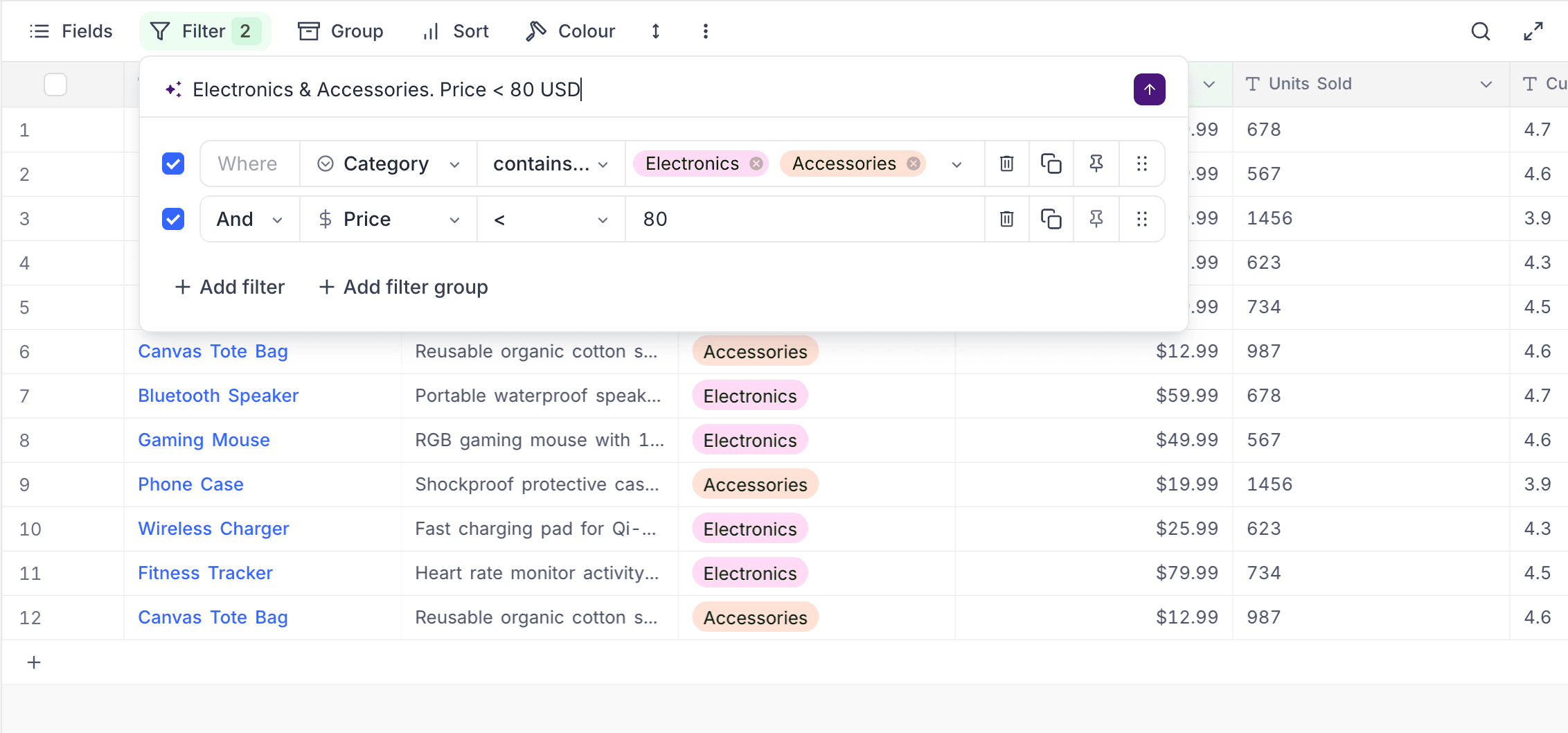
Type prompts like:
- "Show high priority tasks due this week"
- "Items with no status assigned"
- "Score greater than 80"
Three actions: Add (append to existing), Replace (clear and apply new), or Clear (remove all filters). Learn more.
📄 NocoDocs — A Built-in Document Editor for Your Workspace
Our meeting notes live in one tool, project specs in another, and the actual data in NocoDB. Context is scattered everywhere.
As teams build and operate inside NocoDB, the need for structured documentation grows alongside the data. NocoDocs is a rich-text document editor built directly into your NocoDB base, so your documentation lives right next to the data it supports.
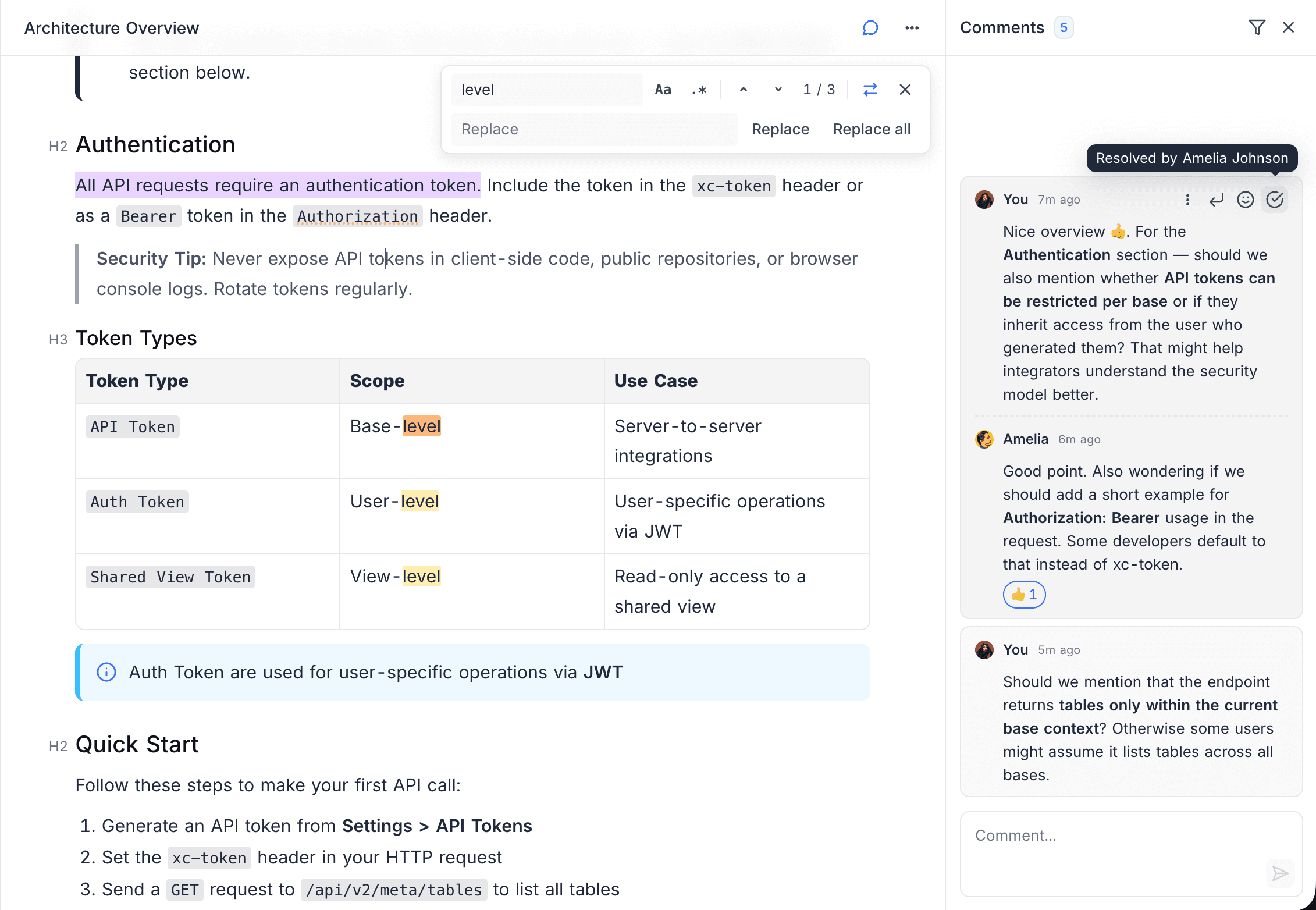
What's Included
- Write and organise documents directly inside your base
- Hierarchical document tree with drag-and-drop ordering
- Rich editing — headings, code blocks, callouts, tables, images, file attachments, embeds, and math expressions
- Inline comments, threaded discussions, and user mentions
- Slash command palette for rapid block insertion
- Auto-save with version tracking
- Export to Markdown, HTML, or PDF
NocoDocs appears as a dedicated section in your base, accessible from the minibar. Learn more.
🧩 De-Duplicate Extension — Now with Multi-Field Support
The De-Duplicate extension now supports selecting multiple fields for deduplication. Records must match on all selected fields to be grouped as duplicates, enabling more precise and granular duplicate detection.
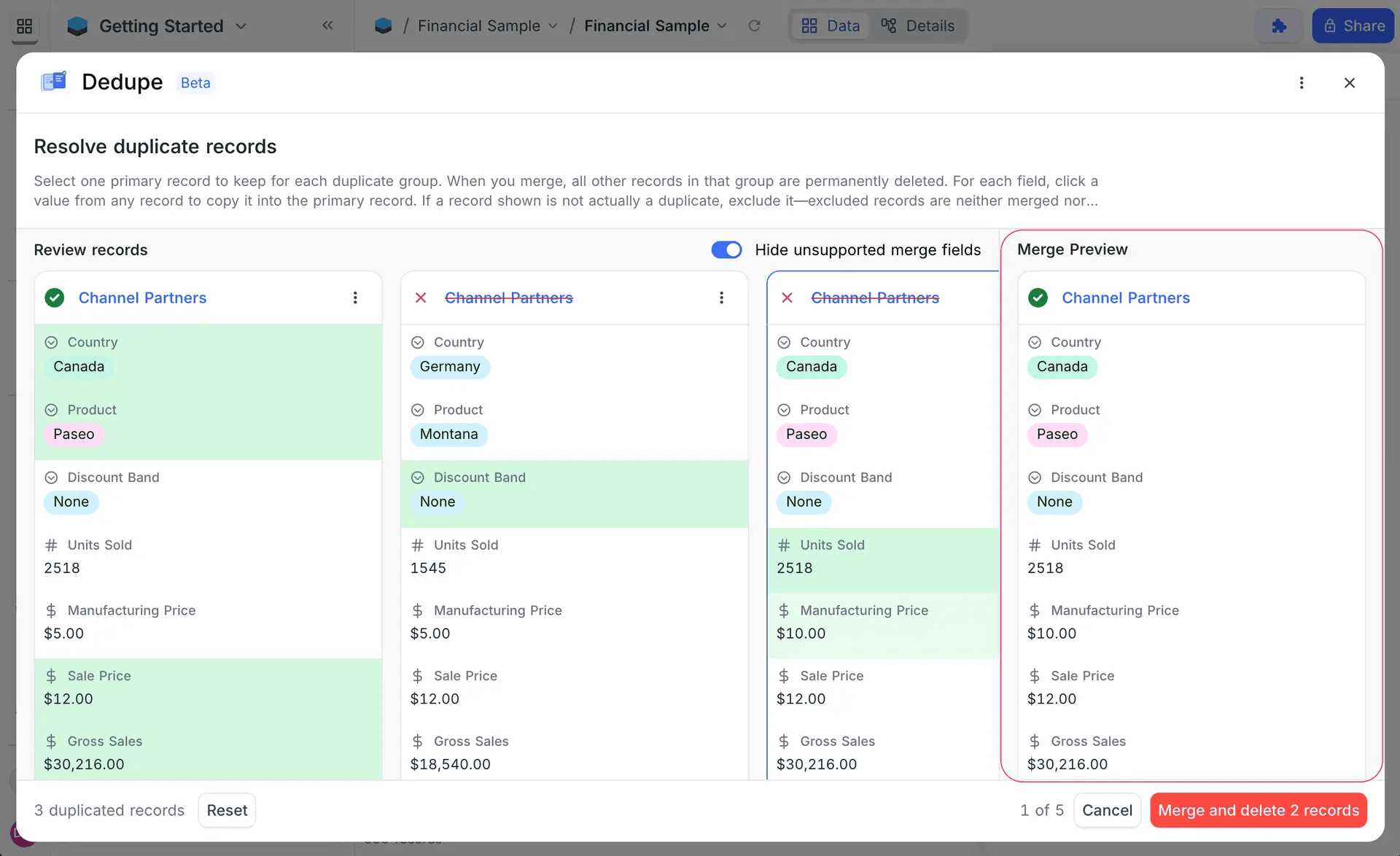
Previously limited to a single field, you can now combine fields like "Email + Name" or "Phone + Company" to identify true duplicates while avoiding false matches. Learn more.
🆕 New Field Types — UUID & Colour
Two new field types to better identify, organise, and visualise your data.
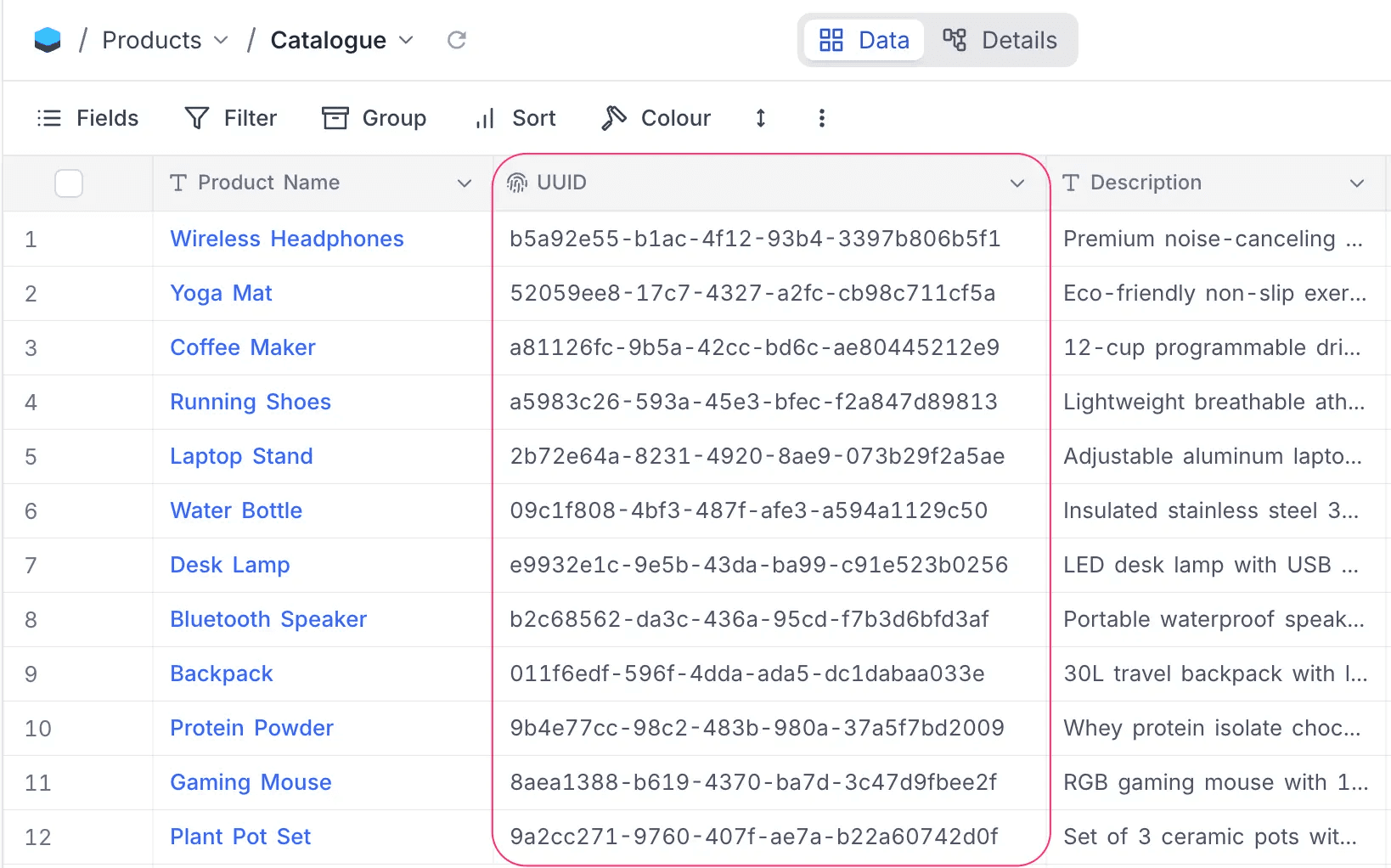
UUID
Automatically generates a universally unique identifier (UUID v4) for each record — a 36-character string like 31c46437-0bb9-4072-bf7a-40cd7aebcae3. Read-only, auto-generated, and unique at the database level. Ideal for external integrations, API references, and cross-system record linking.
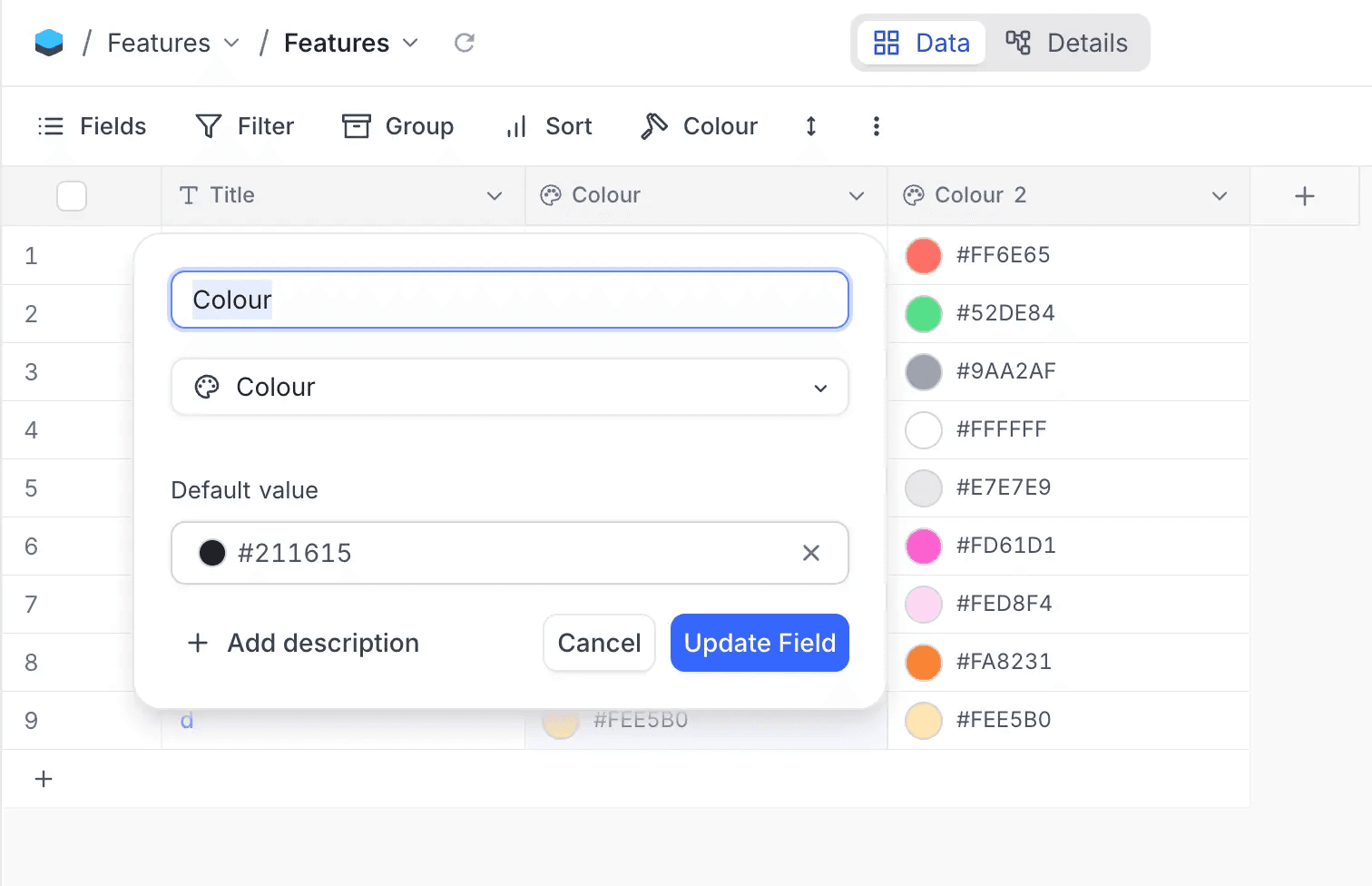
Colour
Stores and displays hexadecimal colour values with a visual colour swatch. Includes a colour picker with a default palette, full colour wheel, and hex input. Perfect for design systems, status indicators, and visual categorisation.
⚡ New Workflow Nodes — GitHub, Google Calendar, Twilio, HubSpot CRM & HTTP
Five new workflow integration nodes expand what your automations can do.
GitHub
Automate your development workflows with direct GitHub integration. Manage issues, pull requests, and labels — all triggered by data changes in NocoDB.
Supported actions:
- Create Issue, Update Issue, List Issues
- Add, Set, or Remove Issue Labels
- Create Pull Request, List Pull Requests
- Webhook trigger for push, pull request, issue, and release events
Google Calendar
Connect your calendar events to NocoDB workflows.
Supported actions:
- Webhook trigger when new events are created on a selected calendar
Twilio
Send SMS, WhatsApp messages, and place automated voice calls directly from your workflows.
Supported actions:
- Send SMS, Send WhatsApp Message, Call Phone
HubSpot CRM
Manage your CRM pipeline directly from NocoDB workflows. Create, update, find, and retrieve contacts, companies, and deals.
Supported actions:
- Contacts: Create, Get, Update, Find
- Companies: Create, Get, Update, Find
- Deals: Create, Get, Update, Find
HTTP Request
Send HTTP requests to any external API or service with configurable methods, headers, query parameters, and request body.
🎨 UI/UX — Improved Minibar, Sidebar & Base Navigation
The navigation experience has been redesigned for faster, more intuitive workspace management.
Redesigned Minibar
- Fish-eye magnification on desktop — icons scale smoothly as you hover, making navigation feel responsive and fluid
- Compact rail layout on smaller screens for space efficiency
- Dedicated sections for Data, Docs, Workflows, and AI Chat — accessible directly from the minibar
- Bottom-grouped controls for Settings, Notifications, and User profile
Sidebar & Workspace Improvements
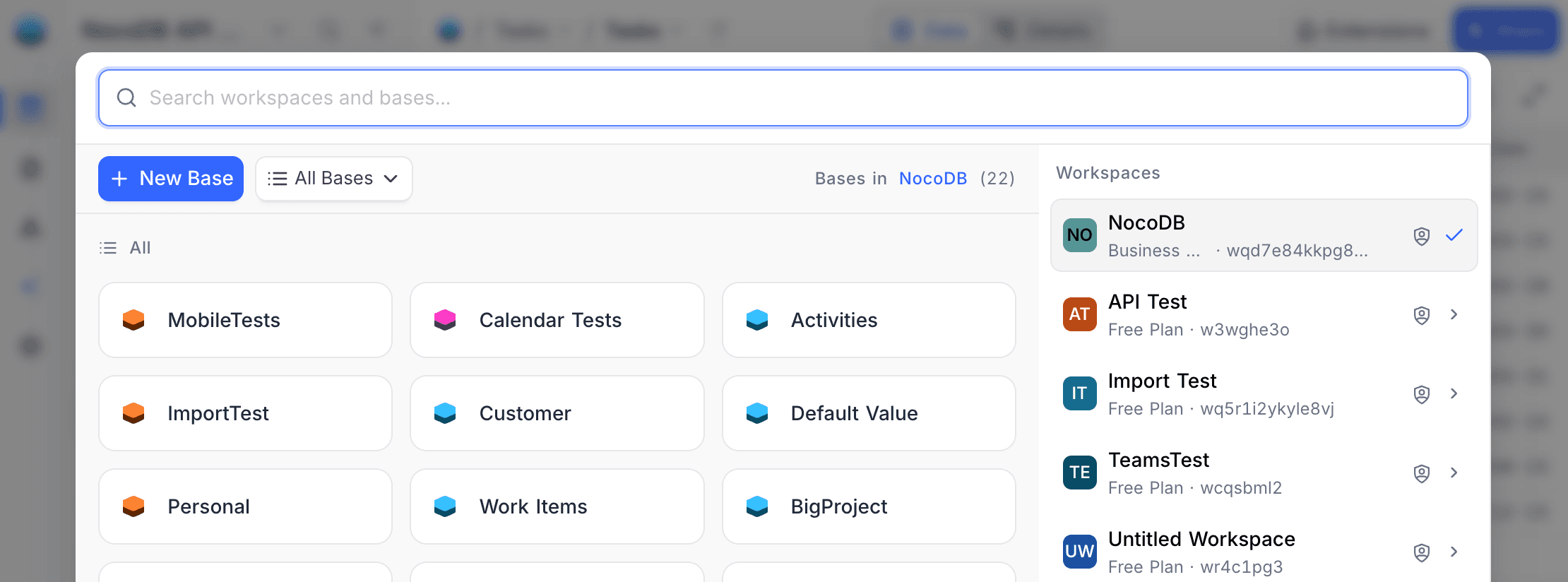
- Cleaner workspace and base switching from the top of the minibar
- Reorganised help menu with categorised resources, community links, and support access
- Improved mobile navigation with adaptive sidebar behaviour
Other fixes & enhancements
Formula SWITCH & IF Improvements
Improved the reliability of SWITCH and IF formula functions across edge cases. Formulas comparing mixed types (e.g. text fields against numeric values) now work correctly on PostgreSQL, and SWITCH expressions with BLANK-only conditions generate valid SQL. Formula type resolution for rollups referencing formula child columns has also been tightened. Comprehensive test coverage has been added for these scenarios.
Minimised Record Bookkeeping for EE On-Premise Installations
Scaled back unnecessary record-count tracking and stat updates for on-premise deployments — keeping bookkeeping overhead to an absolute minimum. Stats now calculate only when essential, and we've hardened the process so edge cases under heavy load no longer cause any disruption across your workspace.
Fixed an issue where grid views grouped by a Lookup field referencing a User field would display loading skeletons instead of rendering the actual cell values.